Improving Factory Workflow Through Smarter HMI Programming
Walk through almost any automated plant and you can spot the difference between a machine that merely runs and a machine that truly supports production. The hardware might be impressive in both cases. Servo axes are fast, robots are accurate, safety is compliant, cycle times look good on paper. Yet one cell flows smoothly and the other constantly pulls supervisors, maintenance techs, and operators into avoidable interruptions. More often than not, the gap is not mechanical. It is the human-machine interface.
HMI programming tends to get treated as the final cosmetic layer, something added after the real controls work is done. That mindset causes trouble. In practice, the HMI is where production logic meets human judgment. It is the control system’s public face, but it is also much more than a faceplate. It shapes how quickly an operator can recover from a fault, how confidently maintenance can diagnose a sensor issue, and how reliably setup technicians can change over from one part family to another without introducing scrap.
I have seen excellent automation projects stumble because the HMI forced people to memorize tribal knowledge instead of presenting the right information at the right time. I have also seen fairly ordinary equipment perform at a high level because the screens were built around real factory behavior. When HMI programming is done well, workflow improves in ways that show up everywhere: fewer stops, faster restarts, cleaner handoffs between shifts, better OEE, and less operator frustration.
The hidden cost of a weak HMI
Most factories do not lose hours all at once. They lose minutes, repeatedly. A machine stops for a missing part sensor. The alarm message is vague, so the operator calls maintenance. Maintenance arrives, clears the fault, and leaves without identifying the cause. Thirty minutes later it happens again. Nobody logs the details because the HMI history is sparse and the alarm description says little more than "part present error." The line keeps moving, but it keeps limping.
That pattern is common in machine tending cells, robotic welding stations, and CNC automation lines. In each case, the machine’s control sequence may be correct, but the interface around that sequence is weak. Operators spend extra time hunting for status bits hidden across multiple screens. Setup parameters sit beside engineering values they should never touch. Faults appear in cryptic PLC language that only a programmer could love. The result is not just annoyance. It is delayed response, longer downtime, more inconsistent operation, and greater dependence on https://hectorcfhb837.novacrestiq.com/posts/choosing-the-right-end-of-arm-tooling-for-manufacturing-robots a handful of experienced people.
Poor HMI design also distorts management decisions. If the screen offers limited production data, the team may blame operators for slowdowns that really come from nuisance faults, slow interlocks, or badly tuned timing windows. If fault history lacks context, recurring failures look random instead of patterned. Plants then spend money on spare parts, extra staffing, or redesigns when the first improvement should have been visibility.
Workflow improves when screens match the job
The best HMIs are built around tasks, not around controller memory maps. That sounds obvious, yet many screens still mirror the programmer’s internal logic rather than the operator’s actual workflow.
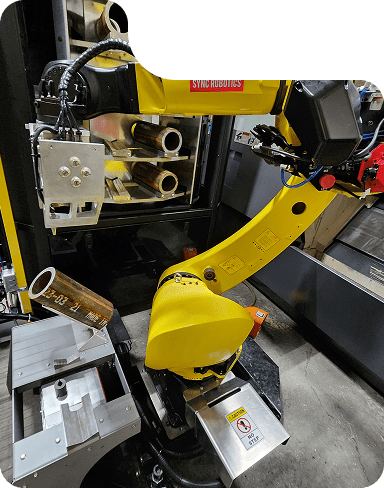
Consider a simple machine tending application feeding raw castings into a CNC lathe. The operator’s job may include loading pallets, acknowledging completed parts, replenishing gripper fingers, checking part orientation, and responding to occasional clamp confirmation faults. If the HMI is designed for that reality, the home screen will answer immediate questions without navigation: Is the robot in cycle? Is the CNC ready? Which station is blocked? How many good parts have been produced? What fault is active, and what does the operator need to do next?
If the same screen is designed around PLC structure, the operator might instead see generic status lamps, a few counters, and a menu tree full of engineering pages. The information exists, technically. It is just not available in a form that supports fast action.
That distinction matters even more in robotic welding. Welding cells often involve several interacting states: fixture clamp verification, part presence confirmation, robot program selection, weld enable conditions, gas flow, tip dress timing, and downstream unload readiness. A skilled HMI can show these dependencies in plain language so the operator understands not only that the cycle stopped, but why it stopped and what has to happen before it can restart. That shortens recovery time and reduces the temptation to bypass steps just to get parts moving.
Good HMI programming starts on the floor
The strongest interfaces I have worked on were not designed entirely from electrical prints or PLC comments. They came from floor time. Watching operators, setup techs, team leads, and maintenance staff use a machine reveals details that no requirements sheet captures.
One operator may wear gloves and work quickly, so small touch targets become a nuisance. Another may run two stations at once, so she needs large, unambiguous status indicators visible from several feet away. A maintenance technician may troubleshoot under pressure during third shift and need a diagnostics screen that clearly separates sensor input states, actuator commands, and permissives. A process engineer may want trend data for clamp pressure or cycle completion time over the last shift, not just daily totals.
You learn these things by observing actual production. I once worked on a CNC automation cell where the original HMI required four screen changes to confirm whether the robot was waiting on the machine door, chuck unclamp, or part detect. The integrator had built sensible pages from a controls standpoint, but the layout ignored the operator’s thought process. We rebuilt the main status page around the sequence itself, using a simple visual flow of machine ready, robot ready, part transfer status, and current cycle stage. Downtime for "unknown stop" events dropped noticeably within weeks, not because the hardware changed, but because people could see the state chain at a glance.
Alarm design is where workflow is won or lost
If I had to name one HMI area that affects workflow more than any other, it would be alarm handling. Factories live and die by how quickly they recover from abnormal conditions.
A bad alarm tells you what bit turned off. A good alarm tells you what happened, what it affects, and what to check first. The wording matters. So does the structure. "Input 14 failed" is nearly useless on the floor. "Load station part present sensor did not turn on within 3 seconds. Check part position, sensor face, and cable at station 1" gives a person a place to start.
That does not mean every alarm needs a paragraph. It means every alarm should carry useful intent. On a well-designed HMI, the active fault display should include a timestamp, severity, machine area, and plain-language description. If the process is complex, the screen should also offer a help panel or linked diagnostic view that exposes the related conditions.
The best alarm systems distinguish between conditions with different operational consequences. A consumable reminder for robotic welding, such as tip dresser service due soon, should not fight for attention the same way as a safety gate circuit failure or a robot collision stop. When everything flashes red, nothing feels urgent. Operators learn to dismiss warnings, and that habit eventually catches up to quality or safety.
These are the alarm traits that consistently help workflow:
- Plain-language fault descriptions tied to physical machine locations
- Clear first-step recovery guidance without hiding technical detail from maintenance
- Sensible alarm priorities so routine notices do not mask critical stops
- Reliable history with timestamps and reset records
- Diagnostic context that shows the interlocks or sensors related to the fault
That list sounds basic, but many factories still operate with alarm systems that fail on three or four of those points.

The home screen should answer urgent questions fast
A plant floor HMI is not a desktop dashboard. People do not interact with it in a calm office environment. They look at it in noise, heat, PPE, shift turnover, and time pressure. That reality should shape the home screen.
The home screen needs to work as a decision screen. At a glance, it should tell the user whether the machine is running, waiting, faulted, starved, blocked, in setup, or in manual. It should indicate current recipe or part number, key production counts, and where the process is held up. In cells with multiple assets, such as a robot servicing two CNC machines or a welding cell with infeed and outfeed accumulation, the screen should reveal which asset is driving the stop.
One mistake I often see is overcrowding. Designers try to make the home screen do everything, so it becomes a collage of buttons, indicators, values, and animation. Operators stop using it because finding the one critical signal takes too long. The better approach is to decide what must be visible immediately, what should be one tap away, and what belongs on restricted service pages.
That takes discipline, especially when every stakeholder asks for "just one more item." The screen should support production, not committee compromise.
Changeovers deserve the same care as auto mode
A surprising number of HMI projects focus heavily on automatic operation and barely address changeover. That is a missed opportunity, because changeovers are where confusion, scrap, and lost time gather.
In machine tending and CNC automation, changeover may involve selecting a part recipe, adjusting gripper offsets, confirming nest hardware, changing jaws or locators, and validating sensor thresholds. In robotic welding, the sequence may also include fixture confirmation, weld schedule selection, wire or gas checks, and quality verifications on the first part off the run.
When the HMI supports changeover well, it becomes a guide rather than a repository. The screen flow should help the user move through the sequence in a controlled way, especially if product families are similar but not identical. A good changeover interface can reduce setup variance between shifts and between experienced and newer personnel.
I prefer changeover pages that show the selected recipe in plain language, identify required tooling by station, and lock out impossible combinations. If end of arm tooling differs between part families, the HMI should prompt the user to verify the correct tooling state and expose any sensors or quick-connect confirmations related to that configuration. This is especially important where modular EOAT is used and a missed tooling latch could damage a fixture or drop a part.
In one application, a robot handled two families of parts with nearly identical dimensions but different clamp requirements. Operators had been selecting the recipe from a number-based list, which led to occasional wrong-part setups. We replaced that with a visually clear part selection screen, recipe naming that matched production paperwork, and an interlocked confirmation page tied to fixture and end of arm tooling checks. Setup errors did not disappear entirely, because human systems never do, but they fell enough to justify the rework within a quarter.
Maintenance screens should shorten diagnosis, not expose chaos
There is a difference between transparency and dumping raw control data onto a screen. Maintenance teams do need visibility, but they need organized visibility.
A good maintenance section usually separates three things: live I/O status, sequence state, and actuator commands. When those are mixed carelessly, troubleshooting takes longer because the technician has to mentally sort what is a command, what is a feedback, and what is merely a prerequisite. That cognitive load matters when production is waiting.
For example, if a servo-driven slide in a robotic welding cell will not extend, the relevant diagnostics page should clearly show extend command, retract command, extend confirmation sensor, retract confirmation sensor, safety permissive, air pressure or drive ready status, and any motion inhibit tied to fixture state. It should not force the technician to search through unrelated pages labeled with internal tag groups.
This is also where HMI programming can support better escalation. If a fault cannot be resolved by the operator’s allowed actions, the diagnostics page should make it easy for maintenance to isolate whether the issue is likely sensor failure, mechanical obstruction, controller inhibit, or upstream handshake. That saves time and reduces the tendency to swap parts blindly.
Data collection matters, but only if it reflects decisions
Many manufacturers want more data from their HMIs, and that is reasonable. The trouble starts when teams collect everything without deciding what they will do with it. More tags do not automatically produce better workflow.
Useful HMI data tends to fall into a few practical categories: cycle time and waiting time by state, alarm frequency, reset history, recipe usage, reject counts, and intervention events such as manual jogs or aborted cycles. Those data points can reveal whether the bottleneck is process-related, mechanical, operator-driven, or upstream.
Take a CNC automation cell with an average cycle of 52 seconds. If the HMI captures only completed cycles, the system may look healthy. If it also records waiting on machine ready, waiting on part supply, and operator intervention time, you may discover that the true loss is not robot motion at all. It may be that a chuck cleanout task every 40 parts is causing repetitive micro-stops, or that parts arrive inconsistently from a wash station. Smarter HMI programming does not fix those issues by itself, but it makes them visible enough to solve.
This becomes even more valuable in robotic welding, where quality and throughput interact. If the HMI logs stop reasons around tip dress intervals, spatter buildup, wire feed faults, or fixture clamp verification, process engineers can tune maintenance schedules and sequence timing with evidence instead of anecdote.
Usability is a production issue, not a design preference
There is a tendency in some projects to reduce HMI discussions to color schemes and button styles. Those details matter less than legibility, consistency, and error prevention.
Operators should not have to decode whether green means "running" on one screen and "available" on another. Manual controls should look different from navigation controls. Actions with machine consequences should require deliberate interaction, particularly during setup or maintenance mode. Units should always be shown. Timing values should not force users to guess whether a parameter is in milliseconds, tenths of a second, or seconds.
Small improvements in usability often produce outsized gains. Enlarging high-use buttons, increasing contrast for status text, standardizing fault reset behavior, and reducing screen depth can save seconds dozens of times per shift. Across multiple cells, those seconds become meaningful.
I have also learned to be careful with animation. Motion graphics can help illustrate machine flow, especially in complex cells, but too much movement becomes visual noise. If everything is animated, nothing draws focus. Animation should serve diagnosis, not decorate the screen.
Security and access control need nuance
Restricting the wrong things can slow workflow just as much as exposing too much. Plants need sensible access levels. Operators should have what they need to run and recover the machine within their role. Setup technicians need broader parameter access. Maintenance needs diagnostics and test functions. Engineers need deeper configuration access. But the structure should reflect reality.
An HMI that forces a supervisor login for every recipe change in a high-mix environment creates a bottleneck. On the other hand, an HMI that lets any user alter sensor debounce or robot handshake timeouts invites instability. The best designs protect machine integrity while keeping routine actions close to the people who own them.
Access control should also account for traceability. If a critical timing parameter was changed before a series of faults or quality defects, someone should be able to identify when it happened and under which access level. That does not require an elaborate system in every case, but even modest logging can save hours during root cause work.
Smarter HMI programming in integrated cells
Workflow gains become more pronounced as cells grow more integrated. A stand-alone machine can survive with a mediocre interface longer than a coordinated system of robots, conveyors, weld fixtures, vision checks, and CNC equipment. In integrated cells, every stop has ripple effects.
Imagine a robotic welding line feeding downstream inspection and palletizing. If the welding cell HMI clearly displays whether the stop is due to fixture not clamped, robot waiting on weld enable, part not seated, inspection reject hold, or pallet full downstream, operations can respond intelligently. Without that clarity, all delays feel the same, and the line gets restarted in a trial-and-error loop.
The same is true in machine tending systems where a robot services multiple machining centers. The HMI should not just announce "cell waiting." It should identify whether the waiting condition comes from machine A cycle complete, machine B alarm, raw part infeed empty, finished part conveyor blocked, or gripper confirmation mismatch. Those distinctions determine whether the operator refills stock, the machinist clears a fault, or maintenance checks the end of arm tooling.
Integrated systems magnify both strengths and weaknesses in HMI design. Good screens coordinate action. Bad screens spread confusion faster.
When to revise an existing HMI instead of replacing it
Not every plant needs a complete redesign. In many cases, workflow improves significantly from a targeted HMI revision. The key is diagnosing whether the problem lies in missing functionality, poor organization, outdated graphics, weak alarm content, or all of the above.
These warning signs usually justify a serious review:
- Operators rely on handwritten notes for common recovery steps
- Maintenance bypasses the HMI and goes straight to PLC software for routine diagnosis
- Changeovers vary widely by shift or by operator
- Recurring faults have no useful history or trend visibility
- Production meetings argue over causes because the machine data is too thin
A focused revision might involve rebuilding the home screen, rewriting alarm text, reorganizing diagnostics by machine area, improving recipe handling, and adding a small set of meaningful metrics. Those updates are often more affordable than teams expect, especially compared with the cost of chronic downtime.
The real standard is confidence
Factories talk about speed, efficiency, and uptime, and rightly so. Yet one of the clearest signs of a strong HMI is confidence. Operators trust the machine because the screen tells the truth in understandable terms. Maintenance trusts the diagnostics because they point toward causes instead of noise. Supervisors trust the counts and stop data because they match what happens on the floor. Engineers trust changeover parameters because access and naming are controlled.
That confidence has operational value. People make fewer defensive workarounds. They escalate problems sooner and with better information. They recover normal production with less hesitation. Training gets easier because the HMI teaches the process instead of hiding it behind jargon.
Smarter HMI programming is not a cosmetic upgrade. It is workflow engineering at the point where humans and automation actually interact. When the interface is built around the job, the sequence, and the decisions people make under pressure, the line runs better. Not because the screen looks modern, but because the work itself becomes clearer.
That is what factories need from an HMI. Clear status. Useful alarms. Reliable guidance. Better changeovers. Better diagnosis. Better decisions made faster. Whether the application is machine tending, robotic welding, CNC automation, or a custom system with specialized end of arm tooling, the principle holds. If the interface helps people understand and act, workflow improves. If it does not, the rest of the automation has to carry unnecessary weight.
Sync Robotics Inc. — Business Info (NAP)
Name: Sync Robotics Inc.Address: 2-683 Dease Rd, Kelowna, BC V1X 4A4
Phone: +1-250-753-7161
Website: https://www.syncrobotics.ca/
Email: [email protected]
Sales Email: [email protected]
Hours:
Monday: 8:00 AM – 4:30 PM
Tuesday: 8:00 AM – 4:30 PM
Wednesday: 8:00 AM – 4:30 PM
Thursday: 8:00 AM – 4:30 PM
Friday: 8:00 AM – 4:30 PM
Saturday: Closed
Sunday: Closed
Service Area: Kelowna, British Columbia and across Canada
Open-location code (Plus Code): VHWR+PQ Kelowna, British Columbia
Map/listing URL: https://maps.app.goo.gl/xwtV2wEu8ZuKH3se8
Embed iframe:
Socials (canonical https URLs):
LinkedIn: https://www.linkedin.com/company/syncrobotics/
Instagram: https://www.instagram.com/syncrobotics/
Facebook: https://www.facebook.com/syncrobotics/
https://www.syncrobotics.ca/
Sync Robotics Inc. is an industrial robot and controls integration company based in Kelowna, British Columbia.
The company designs and deploys automation solutions for manufacturing operations across Canada.
Services include industrial robotics integration, controls integration, automation system design, deployment support, and related manufacturing automation solutions.
Sync Robotics Inc. is located at 2-683 Dease Rd, Kelowna, BC V1X 4A4.
To contact Sync Robotics Inc., call +1-250-753-7161 or email [email protected].
For sales inquiries, email [email protected].
Hours listed are Monday to Friday 8:00 AM–4:30 PM, with Saturday and Sunday closed.
For directions and listing details, use the map listing: https://maps.app.goo.gl/xwtV2wEu8ZuKH3se8
Popular Questions About Sync Robotics Inc.
What does Sync Robotics Inc. do?Sync Robotics Inc. designs and deploys industrial robot and controls integration solutions for manufacturing operations.
Where is Sync Robotics Inc. located?
Sync Robotics Inc. is located at 2-683 Dease Rd, Kelowna, BC V1X 4A4.
Does Sync Robotics Inc. serve clients outside Kelowna?
Yes—Sync Robotics Inc. is based in Kelowna, British Columbia and serves clients across Canada.
What are Sync Robotics Inc.’s hours?
Monday–Friday: 8:00 AM–4:30 PM; Saturday and Sunday closed.
How can I contact Sync Robotics Inc.?
Phone: +1-250-753-7161
General Email: [email protected]
Sales Email: [email protected]
Website: https://www.syncrobotics.ca/
Map: https://maps.app.goo.gl/xwtV2wEu8ZuKH3se8
LinkedIn: https://www.linkedin.com/company/syncrobotics/
Instagram: https://www.instagram.com/syncrobotics/
Facebook: https://www.facebook.com/syncrobotics/
Landmarks Near Kelowna, BC
1) Kelowna International Airport2) UBC Okanagan
3) Rutland
4) Orchard Park Shopping Centre
5) Mission Creek Regional Park
6) Downtown Kelowna
7) Waterfront Park